
View Lead page provides a view of all the information captured of a Lead in Cribs. It allows an Agent to view, edit details of the Lead, including an AI Summary of actions to take. To delete the Lead, go to the Lead Summary and swipe left to delete a Lead.
Intended Users
About
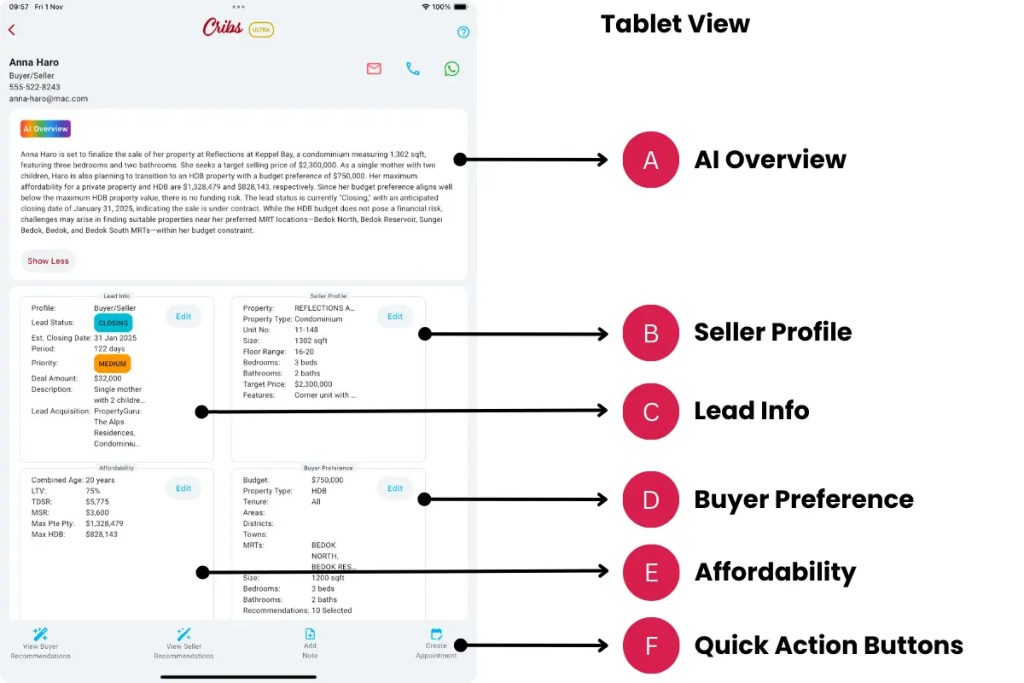
The View Lead page allows an Agent to view all details of a lead that is captured. Cribs generates an AI overview of the Lead, based on all the available information that is captured. It also provides recommendations on how to manage the lead, including any risks and follow-up actions. This feature is only available for Ultra users, and for registered Agents in Singapore.

Elements
A. AI Overview
- Description: Cribs analyses all the available information that is captured for the Lead and provides a summary of the Lead. It also looks at the status, the lead’s affordability, risk and profile of the Lead and provides actionable recommendations for closing.
- Tip: This feature is key feature of Cribs and provides Agents with actionable insights.
B. Seller Profile
- Description: The seller profile includes the project, property type, target selling price and various attributes of the property of the seller. Cribs uses this information to develop a selling strategy, recommended selling price based on past transactions, vicinity transactions and existing listings using AI.
- Tip: Provide a complete profile so that the seller recommendations are more accurate.
C. Lead Info
- Description: Lead info captures all the basic information of the Lead, the priority, status, estimated closing date, deal amount, etc.
- Tip: This information allows the Agent to quickly classify leads and priorities with the various stages of the process.
D. Buyer Preference
- Description: Buyer’s preferences are captured to create buyer recommendations for the Lead. Cribs uses this information to develop a recommendation for the buyer so that the Agent can present a list for the buyer to consider. Once the buyer has given his feedback, the Agent can then arrange for viewings and set appointments for the Lead.
- Tip: Buyer preferences are key in getting Cribs to search through thousands of listings that may fit the preference of the buyer through AI.
E. Affordability
- Description: Setting a buyer’s affordability ensures that the recommendations provided by Cribs are within the financial means of the buyer.
- Tip: Recommendations are found based on Buyer Preferences and Affordability so that the Agent can recommend properties that fit the profile and means of the buyer.
F. Quick Action Buttons
- Description: Depending on the profile of the Lead, the Quick Action Buttons will appear. For Buyer or Buyer/Seller, a Buyer Recommendations button will appear. For Seller or Buyer/Seller, a Seller’s Recommendation button will appear. Create Note and Create Appointment will appear for all profile types.
- Tip: Recommendations are an important aspect of increasing the productivity of an Agent. Both Buyer and Seller Recommendations provide key features that are helpful to the Agent to service the Lead.
G. Notes
- Description: Create notes that will record the interactions with the Lead to improve AI recommendations found in the AI Summary.
- Tip: Notes are an important aspect of servicing Leads. It helps to capture key interactions and progress made, especially after viewings.
H. Upcoming Appointments
- Description: Create or view upcoming appointments.
- Tip: Never miss another appointment.
I. Activity History
- Description: All significant events are captured. AI uses the activity history to track activities and interactions and make recommendations.
- Tip: Activities are key in assisting AI to develop a plan for the Lead.
Exceptions and Error Handling
No records found.
Description: Leads have not been created in the system by the user.
Solution: None.
Contact and Support
Need further assistance? Contact our support team via the About section on our website or email support@cribs.com.sg

