
Lead Management Dashboard provides a quick summary of the performance of leads in Cribs. It allows an Agent to view the important KPIs in order to manage the real estate business.
Intended Users
About
The Lead Management Dashboard allows an Agent to view a summary of the performance of leads in Cribs. One of the challenges of an Agent is keeping on top of all active leads and proactively following up with key actions that will result in positive outcomes. This page can be launched from the Home page under Lead Management. This feature is only available for Ultra users, and for registered Agents in Singapore.
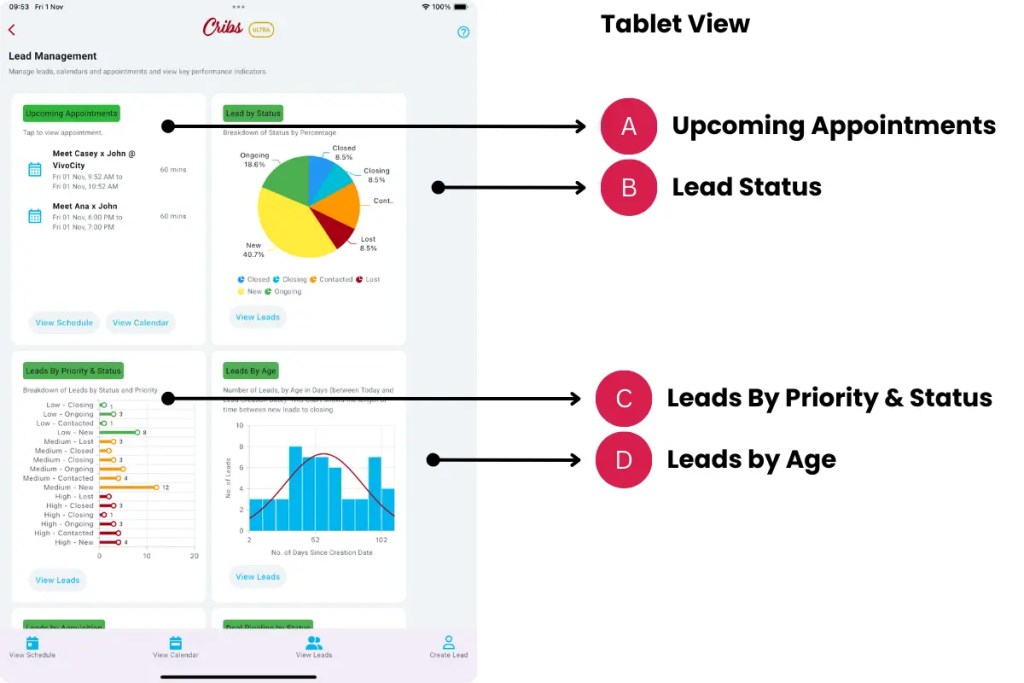

Elements
A. Upcoming Appointments
- Description: Upcoming appointments of the today.
- Tip: Quickly identifies all the forthcoming appointments.
B. Lead Status
- Description: A summary of all leads and the corresponding statuses. The statuses are ‘New’, ‘Contacted’, ‘Ongoing’, ‘Closing’, ‘Closed’ and ‘Lost’. The status of each Lead can be updated at each stage of the process to reflect the progress.
- Tip: Keep abreast of leads and understanding where they are in the entire process of buying or selling. Updating the status of each lead will provide a more accurate Deal Forecast (G).
C. Leads by Priority and Status
- Description: Leads have different priority levels – High, Medium and Low. Due to different selling times, the Agent may wish to prioritise Leads that are more important than others. This chart allows the Agent to view the different priorities and which status they are in the process.
- Tip: Assign leads with longer lead times to Medium or Low priority.
D. Leads by Age
- Description: Lead Aging is the concept of measuring the point when the lead is created and when it is closed. Understanding this will provide a clearer picture of where the bottlenecks are in the entire buying or selling process and make corresponding improvements in serving the customers.
- Tip: Look for the highest surge in age which will identify problematic processes in that stage.
E. Leads by Acquisition
- Description: Lead Acquisition is an important part of the real estate business. Oftentimes, it is is challenging to attribute leads to channels, especially when multiple listings occur on different platforms. Cribs unifies all the listings made in major listing platforms and allows the Agent to attribute the listings to leads.
- Tip: Understanding where leads are acquired will allow the Agent to adjust and fine tune marketing expenditure and reduce costly ads on platforms that do not provide the right level of lead generation that is expected.
F. Lead Pipeline by Status
- Description: The Lead Pipeline shows the expected deal amount in each stage of the buying or selling process. Each lead has an expected deal amount or agent commission. By tracking this accurately, the Agent can understand where the bulk of the anticipated revenue is being held. Unlocking the funnel and optimising the stages of selling will accelerate earnings.
- Tip: Update the deal amount frequently to reflect buyer or seller’s commission, or co-broking opportunities.
G. Deal Forecast
- Description: Deal Forecast is a representation of the realisation of an agent’s commission. It is based on the probability of closing a lead, based on the current stage in which the lead is in. For example, a lead that is in ‘New’ status has only a 10% probability of closing, ‘Contacted’ has 30% chance, ‘Ongoing’ has a 50% chance, ‘Closing’, when a lead has signed the Option to Purchase, is a 80% chance of closing, and ‘Closed’ is 100%. A ‘Lost’ lead is one that is not responsive and is considered dead.
- Tip: Update the lead status regularly to get a more accurate forecast.
H. View Schedule
- Description: The View Schedule quick action button leads to the Today’s view of the Calendar.
- Tip: Keep abreast of all the upcoming appointments at a glance.
I. View Calendar
- Description: The View Schedule quick action button leads to the Calendar.
- Tip: Keep abreast of all the appointments at a glance.
J. View Leads
- Description: The View Leads quick action button shows the Lead Summary page.
- Tip: This feature shows all the leads and allows the editing of each lead.
K. Create Leads
- Description: The Create Lead quick action button shows the Lead Creation page.
- Tip: This feature is a link to quickly create a lead.
Exceptions and Error Handling
No records found.
Description: Leads have not been created in the system by the user.
Solution: None.
Contact and Support
Need further assistance? Contact our support team via the About section on our website or email support@cribs.com.sg

