
Login to Cribs using Email, Password. Alternatively, sign-in with Google or Apple credentials for convenience.
Also Available on the Web
Users can now experience the Web version. Click on the image below.

Intended Users
What To Expect
Here is a shot video clip on the Login process using Email and Password. When an incorrect email and password is used, a message “Incorrect email address or password” will be displayed. Upon successful login, the user will be redirected to the Home page. The user can logout by tapping the Logout icon on the top right corner.
About
The Login Page is the application access to Cribs for users that have already registered for Cribs. You can sign in using your Email and Password or conveniently use your Google or Apple credentials.
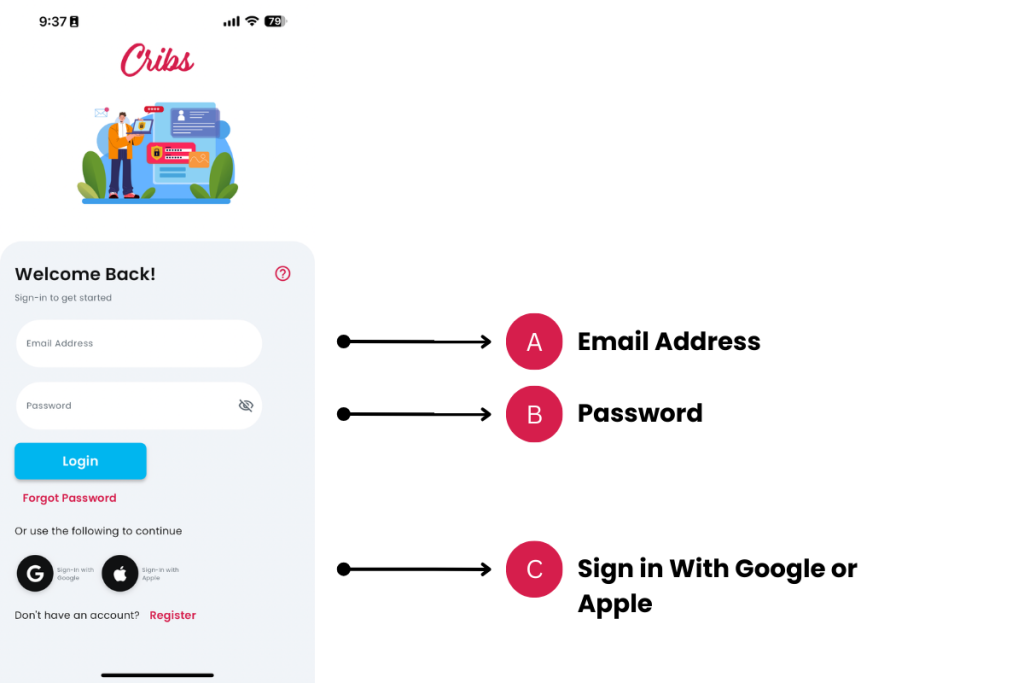
Fields
A. Email Address
- Description: Enter the email address you used during the registration process.
- Tip: Ensure there are no spaces or typing errors.
B. Password
- Description: Enter the password you created during registration.
- Tip: Passwords are case-sensitive. Double-check for any typos.
Sign-In Options
A + B. Sign-in with Email and Password
Steps:
- Fill in the Email and Password fields.
- Tap the Login button.
Troubleshooting:
If the login fails, verify your email and password, then try again.
C. Sign-in with Google
Steps:
- Tap the Sign-in with Google button.
- Follow the prompts to sign in with your Google account.
Note: First-time users can use this method to register.
C. Sign-in with Apple
Steps:
- Tap the Sign-in with Apple button.
- Follow the prompts to sign in with your Apple ID.
Note: First-time users cannot use this method to register. Apple users will need to Register before using Sign-in with Apple.
Additional Options
Register
Description: Tap the Register button to create a new Cribs account.
Steps:
- Follow the prompts on the Registration page to complete your registration.
Forgot Password
Description: Tap the Forgot Password button if you cannot remember your password.
Steps:
- Follow the prompts to reset your password via email.
Exceptions and Error Handling
Incorrect Password
Description: If you receive an error message stating the password is incorrect.
Solution: Re-enter your email and password, ensuring both are correct. If the problem persists, consider using the Forgot Password option.
Forgot Password
Description: If you have forgotten your password.
Solution: Tap the Forgot Password button and follow the instructions to reset your password.
Contact and Support
Need further assistance? Contact our support team via the About section on our website or email support@cribs.com.sg

