
Create Lead page provides a wizard like process to capture important information about a lead, thereby facilitating AI in developing actionable insights that will save time and improve productivity for Agents.
Intended Users
About
Creating a Lead is an easy and straightforward process in Cribs. With its wizard-style process, information is captured through a step-by-step guide. It is important for the information to be entered as accurately as possible. Cribs will use this data to develop AI-based recommendations for buyers and sellers, thereby lowering the time spent by Agents on developing property options for buyers, but also analysing market conditions and providing with pricing guidance to sellers. This feature is only available for Ultra users, and for registered Agents in Singapore.
Elements
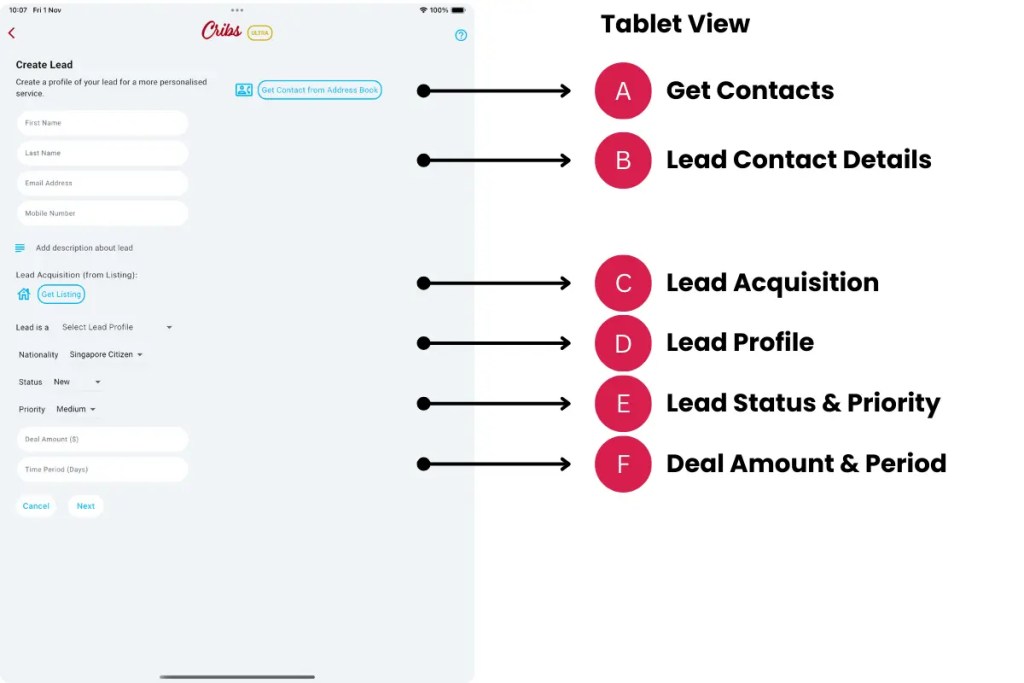
A. Get Contacts
- Description: Obtain contacts directly from the user’s device phone list. Cribs will seek user’s permission before retrieving a list of contacts from the device’s address book that can be directly imported into Cribs.
- Tip: This feature is time-saving feature as Name, Email and Contact Number can be imported into the corresponding fields.
B. Lead Contact Details
- Description: If the user does not choose to select and import details from the device’s address book, details such as First Name, Last Name, Email and Phone Number can be manually entered.
- Tip: Import contacts from device phone book to speed things up in the lead creation process.
C. Lead Acquisition
- Description: Listings will be automatically shown, based on the Agent’s listings across major listings portals. The user can select one of these listings where the lead was generated from.
- Tip: This information allows the Agent to track the return on advertising spend (ROAS) and monitor lead acquisition activities.
D. Lead Profile
- Description: A Lead’s Profile will determine which types of information are captured. A Lead Profile can be a Buyer, Seller, Buyer/Seller (in event that the Agent is managing both the seller’s property and helping to buy the next property), Renter and Landlord (for property owners that are renting their properties out).
- Tip: Select the right profile so that AI can automate recommendations.
E. Lead Status & Priority
- Description: Setting and updating a lead’s status will correctly provide KPIs on forecast deal amounts, lead aging reports, etc. Updating a lead’s priority will allow the Agent to achieve better time management and focus on higher priority leads first.
- Tip: Update Status and Priorities regularly to stay on top of the engagements with Leads.
F. Deal Amount & Period
- Description: Enter a deal amount that is reflective of the expected commission if the lead is closed. Period is the estimated time to close the lead that results in a sale/rental.
- Tip: Cribs automatically calculates forecast deal amounts based on the probability of closing a lead, and the time taken to close the lead. This provides insights into an Agent’s overall productivity and performance.
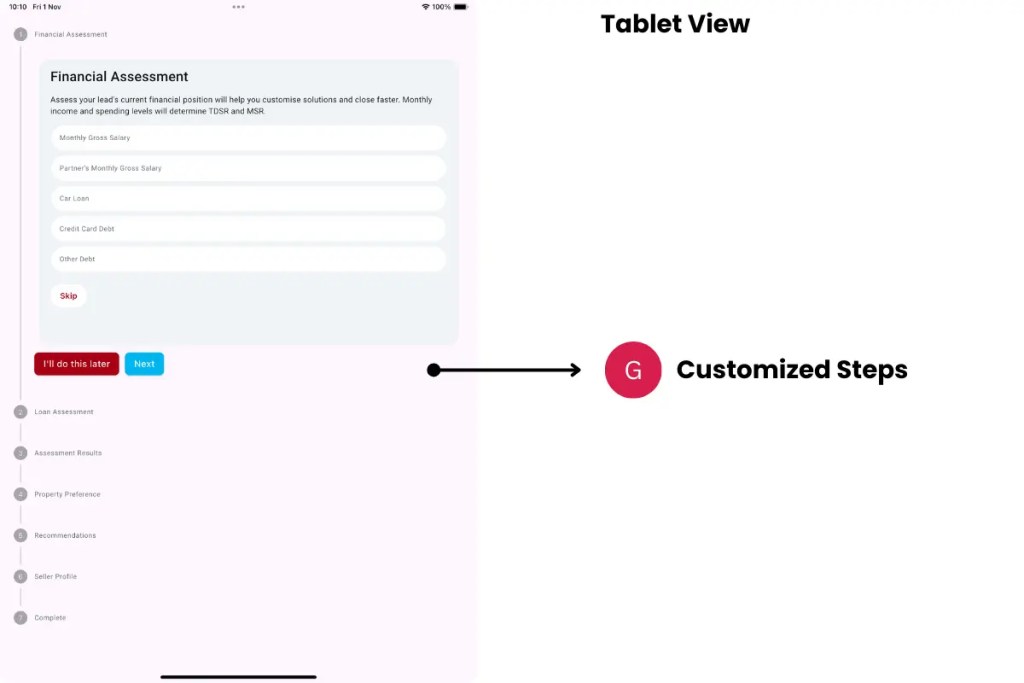
G. Customised Steps
- Description: Depending on the profile of the lead, customised steps will be presented to capture the correct type of information that allows Cribs to provide recommendations through AI.
- Tip: Enter the information as accurately as possible to improve AI results.
Exceptions and Error Handling
No records found.
Description: Leads have not been created in the system by the user.
Solution: None.
Contact and Support
Need further assistance? Contact our support team via the About section on our website or email support@cribs.com.sg

