
Buyer Recommendations page provides a list of properties that the buyer could consider based on buyer preferences. It uses AI to search for the best matches, based on many factors, including the buyer’s affordability.
Intended Users
About
Buyers Recommendation page provides a list of properties that the buyer could consider based on buyer preferences that are defined for the Lead. It uses AI to find the best match, based on factors such as budget, size of property, number of bedrooms, bathrooms, proximity to MRT stations, financial affordability, etc. Finding the right fit for a buyer is often the most time consuming part of the agent’s time. This feature reduces down the time in which to make a recommendation to the buyer, but also presents to the buyer a well-curated list that is generated by AI that could be shared with the buyer. This feature is only available for Ultra users, and for registered Agents in Singapore.
To start, first Edit the Preferences (or use the preference that was set up during the Lead Creation process). A list of Recommendations will appear that has been found by Cribs using AI. Add Properties manually to create a list that can be recommended. Once the list has been curated (recommended to have 10 or less properties), the list can then be shared with the Lead.

Elements – Buyer Recommendations
A. Quick Action Buttons
- Description: The initial process of setting up Buyer Recommendations, involves in getting the Buyer Preferences correct. Edit Preferences allows the user to fine-tune the recommendations to get the right properties for the Lead. The list of recommendations are manually curated for the Lead by the Agent by adding specific properties to the Recommendations list. The user can Clear the Recommendations list and start over again. Once the user is satisfied with the list, it can be shared to the Lead through the Share with Lead function. This feature uses AI to generate a specially personalised message that can be shared with the Lead from the curated list that has been prepared by the Agent.
- Tip: Ensure that the Buyer Preferences are input before using this function. If the Recommendation list if not prepared, AI will generate a list of Recommendations to Add.
B. List of Properties
- Description: This is a list that has been curated by the Agent, selected from the Recommendations found by AI.
- Tip: Prepare the Buyer Preferences and then add properties to this list for the Lead.
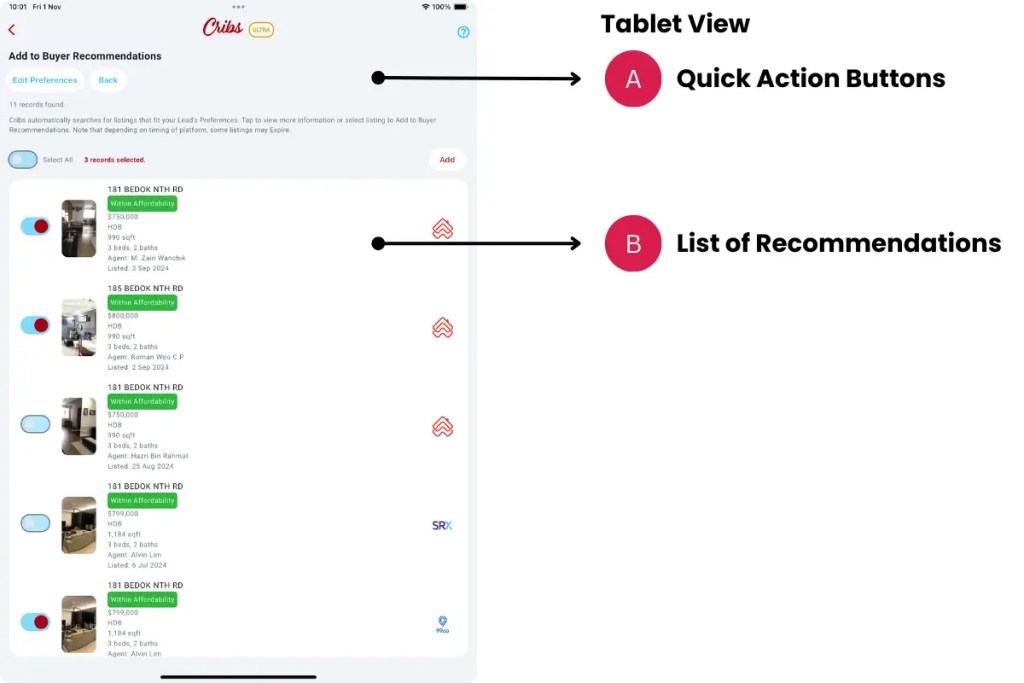
Elements – Add to Buyer Recommendations
A. Quick Action Buttons
- Description: Edit Preferences allows the user to fine-tune the recommendations to get the right properties for the Lead. The list of recommendations are manually curated for the Lead by the Agent by adding specific properties to the Recommendations list. Cribs uses AI to find properties that match the Buyer Preferences.
- Tip: Ensure that the Buyer Preferences are input before using this function. If the Recommendation list if not prepared, AI will generate a list of Recommendations to Add.
B. List of Recommendations
- Description: This is a list that has been curated by the Cribs, selected from the Recommendations found by AI. Add properties to the Buyer Recommendations.
- Tip: Prepare the Buyer Preferences and then add properties to the Recommendations list for the Lead.
Exceptions and Error Handling
No records found.
Description: Leads have not been created in the system by the user.
Solution: None.
Contact and Support
Need further assistance? Contact our support team via the About section on our website or email support@cribs.com.sg

