
Properties Around Me page shows properties around the user location based on the current user device’s GPS.
Intended Users
About
Properties Around Me page shows properties around the user location based on the current user device’s GPS. It is useful for users when they are on-the-go and would like to check for property information around the user’s present location. Permissions will need to be granted before using this function – Always or While Using This App. This permission is asked only once and at the beginning of launching the function from the Home page toolbar (top right). It is recommended that the user chooses While Using This App to access this function. If the user does not allow this permission, the function will not work. You can always change this permission through the device’s settings at any time.

Elements
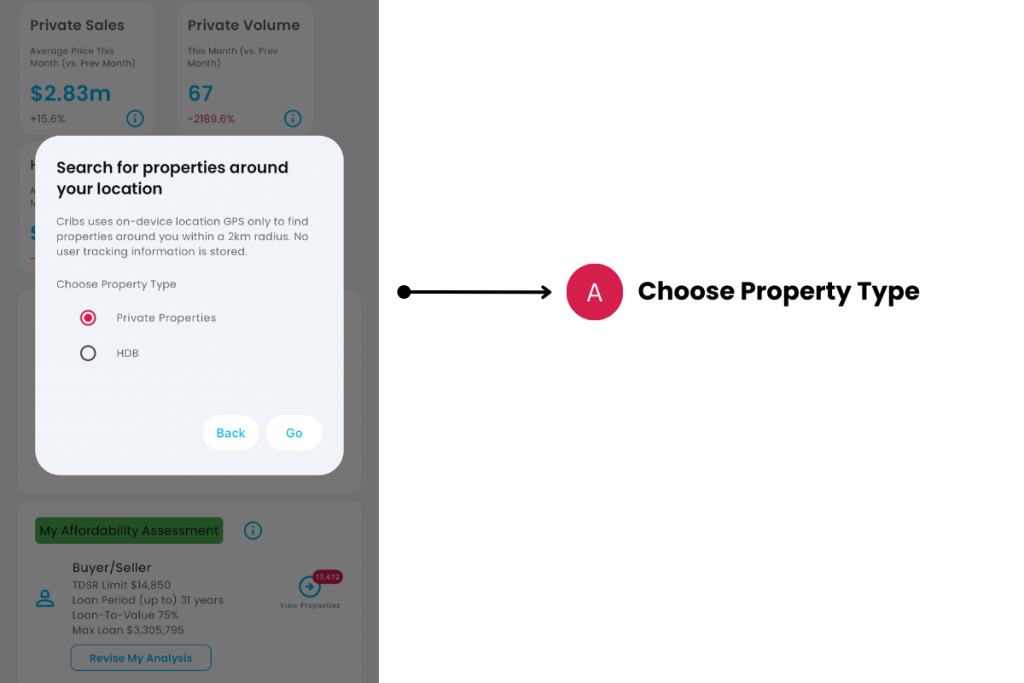
A. Choose a Property Type
- Description: Choose a Property Type such as Private Properties or HDB to find the type of properties around you.
- Tip: If you like a neighbourhood and want to learn more about the properties there while visiting it, turn on this function and learn more about the homes around you.
B. List of properties
- Description: List of properties will show. You can tap on any record to view the Property Details page.
- Tip: Have fun!
Exceptions and Error Handling
No properties found
Description: Your phone may not have GPS or it may not be working, or you may be in an area that does not have HDB flat or Private Residential properties. If it does, you may not have granted permissions sufficient for the function to work.
Solution: Find out if your device supports Global Positioning System (GPS) or move to a different area. If you device supports GPS, go to your device settings and find Cribs to turn on Location permissions. Check with your device manufacturer if you’re unsure of how to do this.
Contact and Support
Need further assistance? Contact our support team via the About section on our website or email support@cribs.com.sg

