
Rent PSF Analysis page provides users with an analysis of a property’s rent PSF in relation to its rent listings PSF and vicinity rent PSF.
Intended Users
What To Expect
Here is a shot video clip on Rent PSF Analysis.
About
Rent PSF Analysis page is a key feature of Cribs and provides users with an advanced analysis of a property’s rent PSF in relation to its rent listings PSF and vicinity rental PSF. It uses advanced analytics visualisation to present users with a combined view of a property’s rent PSF in its ecosystem. This is a powerful feature of Cribs as it allows users to understand a property’s rent PSF within its context and is used to price a property correctly for rent. This page is launched from the Property Details page, under Learn More options.


Elements
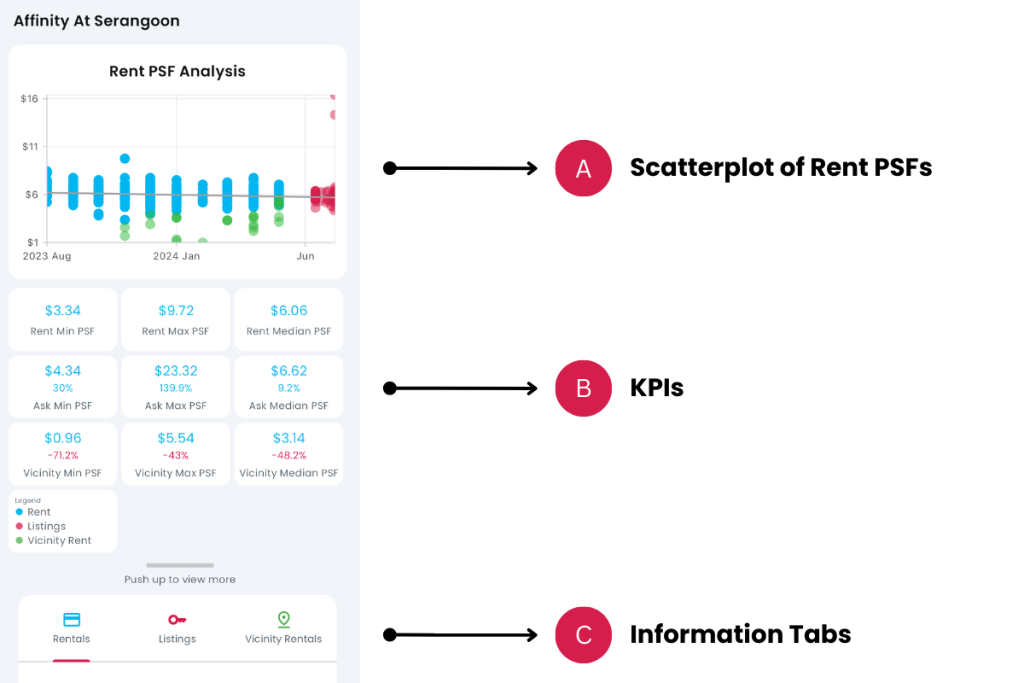
A. Scatterplot of PSFs
- Description: The scatterplot chart combines all the rent PSFs into a single combined visualisation. The PSF values are colour-coded for easy reference – Blue for Rent PSFs, Red for Rental Listings PSFs and Green for Vicinity Rent PSFs. Only the past 12 months data is plotted. Typically, listings do not remain active for over a year.
- Tip: Push up the Information Tab to reveal the Tab Body.
B. KPIs
- Description: A summary of KPIs are presented in three groups – Rent (for past sales), Ask (for Listings) and Vicinity (for vicinity sales). Each group has a minimum PSF, maximum PSF and a median PSF.
- Tip: The percentage comparison of Ask and Vicinity is in relation to Rent. For example, Ask Min is compared to Rent Min, Ask Max is compared to Rent Max and Ask Median is compared to Rent Median, and so on.
C. Information Tabs
- Description: The information tabs group the transactions into 3 types of Tab Groups – Rentals, Listings and Vicinity Rentals.
- Tip: Tap on any tab to see the respective Tab Body. For example, tap on Rentals to show all Rental transactions.
D. Rental Transactions
- Description: List of rental transactions of the property.
- Tip: The list is sorted by latest transactions first.
E. Rental Listings
- Description: List of Rental Listings from major property platforms.
- Tip: Tap on any row to go to view Listing.
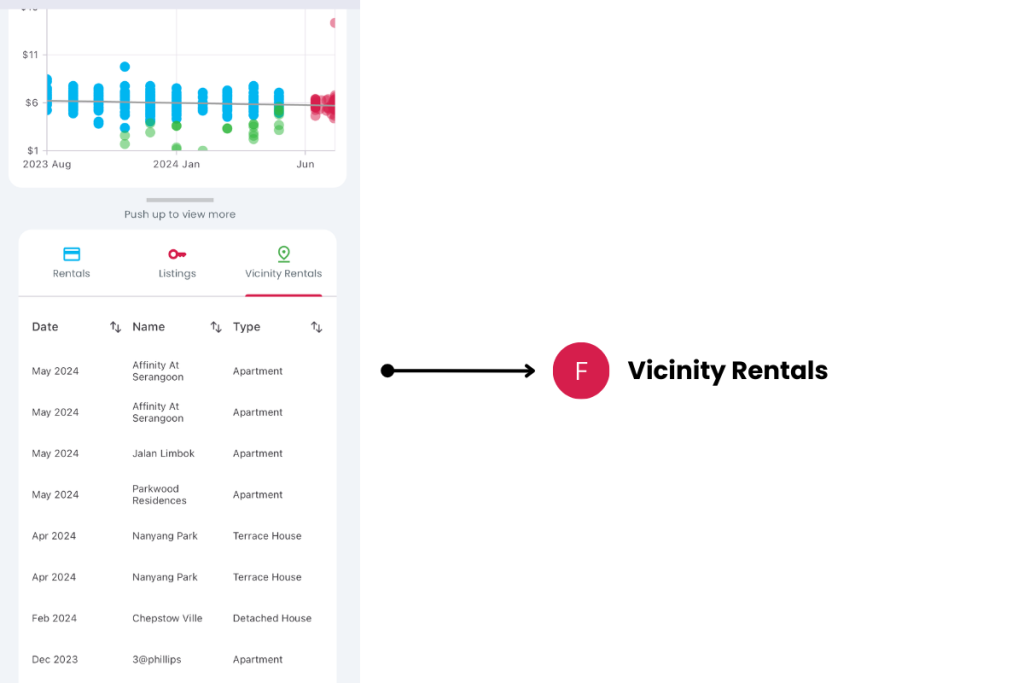
F. Vicinity Transactions
- Description: List of vicinity rentals 500m around the property. Only the latest transaction is shown per property.
- Tip: Tap on any row to go to the Property Detail page of the property.
Exceptions and Error Handling
No transactions found.
Description: In the unlikely event that you don’t see any rental transactions, it could mean that this property is new, still in development or no units currently rented out.
Solution: None.
Contact and Support
Need further assistance? Contact our support team via the About section on our website or email support@cribs.com.sg

