
Seller Recommendations page provides seller suggestions that the seller could consider including pricing analysis and listing advertising. It uses AI to analyse the recent transactions, vicinity transactions and existing listings to recommend a pricing strategy and uses the property features to propose a listings advertisement.
Intended Users
About
Sellers Recommendation page provides an analysis of the Seller’s property, its features and looks into the recent transactions, vicinity transactions and existing listings to make a recommendation on pricing and a suggested listing advertisement. This is a remarkable time saving feature as oftentimes, an agent has to conduct extensive research to price the property correctly, and develop an listing advertisement based on the features of the property. This feature is only available for Ultra users, and for registered Agents in Singapore.
To start, first Edit the Preferences (or use the preference that was set up during the Lead Creation process). A list of Recent Transactions, Vicinity Transactions and Listings will appear that has been found by Cribs using AI. Once this has been found, tap on View Recommendations and AI will analyse the pricing and provide a suggestion on the listing advertisement.
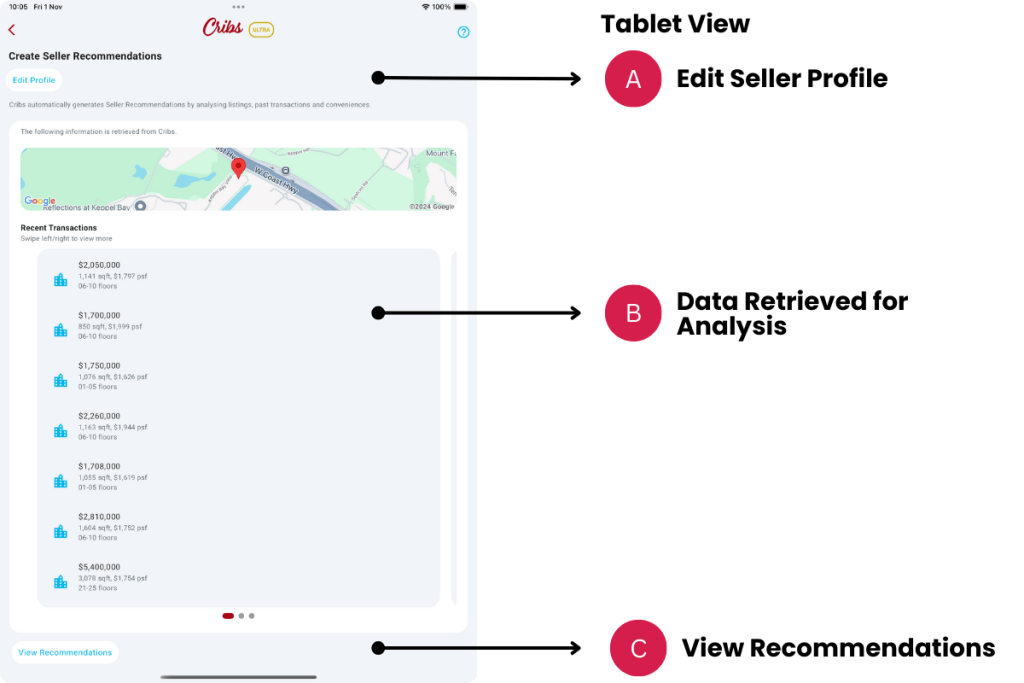

Elements – Create Seller Recommendations
A. Quick Action Buttons
- Description: The initial process of setting up Seller Recommendations, involves in getting the Seller Profile correct. Edit Profile allows the user to fine-tune the features of the property to get the right inputs for AI. The recommendations can be shared to the Lead for confirmation before proceeding with the listing on multiple platforms.
- Tip: Ensure that the Seller Profile are input before using this function.
B. Data Retrieved for Analysis
- Description: This is a list that has been found by AI in order for Cribs to analyse the pricing and position the property correctly.
- Tip: Ensure that the Seller Profile are input before using this function. Cribs will not be able to find the property’s data correctly if the definitions are incorrect.
Elements – Seller Recommendations
A. Quick Action Buttons
- Description: Edit Profile allows the user to fine-tune the features of the property to get the right inputs for AI. Revise button generates the Seller Recommendations again if the inputs have changed in Edit Profile. Back button allows the user to switch back to view the data that has been gathered. Share with Lead allows the user to share the Recommendations with the customer.
- Tip: Ensure that the Seller Profile are input correctly before using this function. Share with Lead provides a printable PDF with images that can be shared with the Lead via text or email.
B. Pricing Analysis
- Description: Cribs takes into consideration different data sources in order to analyse the selling pricing strategy. It will inform the user if the price is above or below the market value and provides observations and recommendations.
- Tip: Ensure that the Seller Profile are input correctly before using this function.
B. Suggested Listing Advertisement
- Description: Cribs takes into consideration the features of the seller’s property in order to provide a suggested listing advertisement between 200 and 250 words that can be used in a listings platform. This feature uses AI to summarise key selling points of the property and why a potential buyer should consider it.
- Tip: Ensure that the Seller Profile are input correctly before using this function.
Exceptions and Error Handling
No records found.
Description: Leads have not been created in the system by the user.
Solution: None.
Contact and Support
Need further assistance? Contact our support team via the About section on our website or email support@cribs.com.sg

