
Profile page shows the user’s account information and subscription plan. Users may also change password from this page and revise Affordability Analysis.
Intended Users
About
Profile page shows the user’s account information and subscription plan. In addition, users may change password from this page and revise Affordability Analysis. This page is launched from the Home page toolbar found on the top right by tapping on the Person icon.
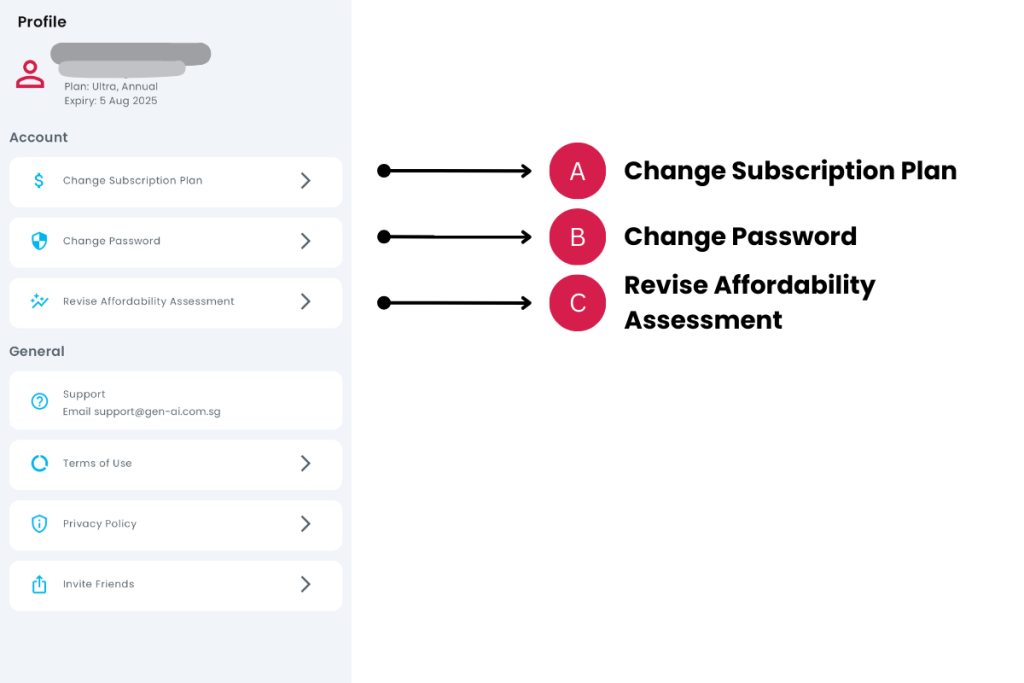
Elements
A. Change Subscription Plan
- Description: You may change your subscription plan by tapping on this option.
- Tip: You can upgrade or downgrade your plan anytime using this option. To cancel your subscription plan, go to the App Store or Play Store app on your device. Terms and conditions apply.
B. Change Password
- Description: To change password, tap on this option. The same option is provided in the Forgot Password page at Login.
- Tip: An email will be sent to your registered email address. Follow the link and instructions that follow.
C. Revise Affordability Analysis
- Description: You can change the Affordability Analysis to a Buyer/Seller, Renter or Agent by tapping on this option.
- Tip: You can also revise your affordability analysis from the Home page by tapping on the User Profile – ‘Revise Affordability Analysis’ for Buyer/Seller, Renter or Agent.
Contact and Support
Need further assistance? Contact our support team via the About section on our website or email support@cribs.com.sg

