
Calendar page provides a simple easy to use appointment scheduler that synchronises with the device calendar.
Intended Users
About
The Calendar feature provides a simple, easy to use appointment scheduler that can be synchronised with the device’s calendar so that invitations and reminders can be send from a single consolidated place. This feature is only available for Ultra users, and for registered Agents in Singapore.
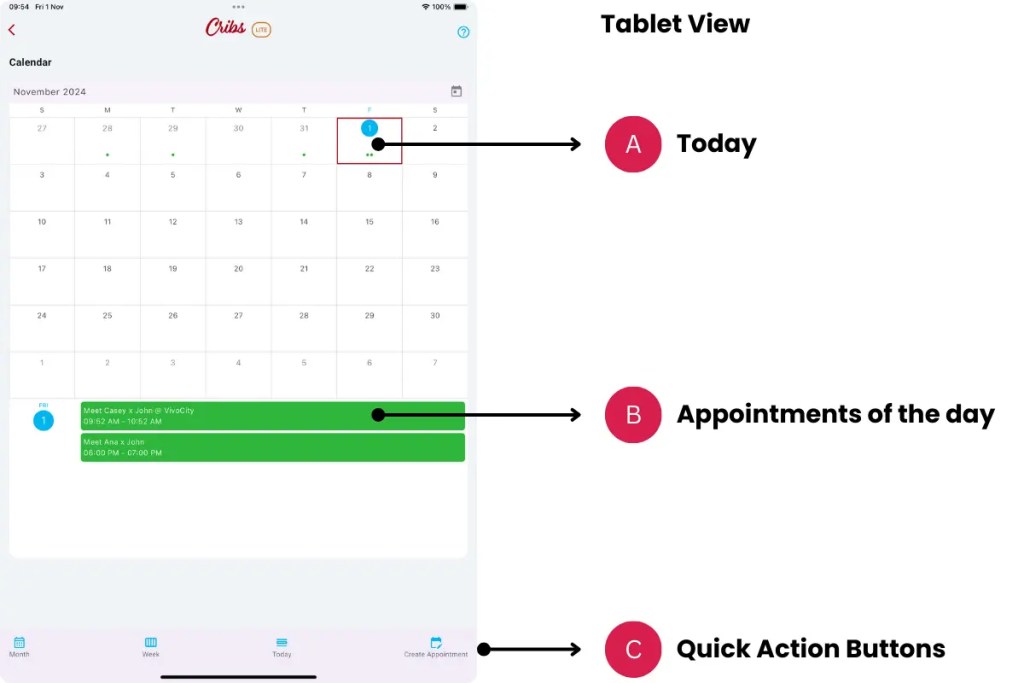

Elements – Calendar
A. Today
- Description: The current day is automatically selected. All appointments are displayed below.
- Tip: This feature is time-saving feature as the user can glance at all the appointments at a one go.
B. Appointments of the day
- Description: Each appointment can be viewed, edited or deleted by tapping on it. Changing the appointment details will change the device’s calendar details as well, if the Sync Calendar option is selected.
- Tip: Consolidate all appointments into the device’s calendar for more productive time management.
C. Quick Action Buttons
- Description: Different views such as Month, Week and Day can be chosen from the Quick Action Buttons.
- Tip: Choose the view that suits the current need.
Elements – Create Appointment
A. Sync Calendar
- Description: The Calendar feature allows device calendar synchronisation so that all calendar events occur from the same place. This is a productivity feature as the device’s calendar can consolidate all work and personal events, send reminders, invitations and notifications. Each device has a default calendar to use, but users may have multiple calendars set up for work, personal, etc. Choose the right Calendar for the right appointment.
- Tip: This feature is time-saving feature. Recommended to use.
B. Location
- Description: The location of the meeting can be set. It uses all standard address formats in Singapore. Search for any address by entering the postcode, street name or property.
- Tip: Be precise in setting the meeting location.
C. Attendees email
- Description: Useful for synchronising with the device’s calendar as it will send an invitation to the attendee. If Sync Calendar is turned off, attendees email will not be used. Cribs will not send notifications or reminders on its own.
- Tip: Use the Sync Calendar feature.
Exceptions and Error Handling
No records found.
Description: Leads have not been created in the system by the user.
Solution: None.
Contact and Support
Need further assistance? Contact our support team via the About section on our website or email support@cribs.com.sg

